Choosing the right model
Choosing the right LLM is one of the first decisions when building an AI application.
Different models are designed for different purposes. Some models are trained to generate text, others are optimized to follow instructions, and some focus on efficiency or multimodal tasks.


What are base models?
Base models, also called foundation models, are the starting point of most LLMs. They are typically trained on a massive corpus of text data through unsupervised learning, which does not require labeled data.
During this initial phase, known as pretraining, the model learns general language patterns, such as grammar, syntax, semantics, and context. It becomes capable of predicting the next word (or token) and can perform simple few-shot learning (handling a task after seeing just a few examples). However, it does not yet understand how to follow instructions and is not optimized for specific tasks out of the box.
To make them useful, they typically undergo fine-tuning on curated datasets, using techniques like instruction fine-tuning. From a base model you can create:
- Instruction-tuned models
- Chat models
- Fine-tuned domain models
- RLHF aligned models
Base model examples: Qwen3.5-0.8B-Base, DeepSeek-V3-Base, GPT-style pretraining models
Instruction-tuned vs. chat models
Instruction-tuned models are built on top of base models. After the initial pretraining phase, these models go through a second training stage using datasets made up of instructions and their corresponding responses.
This process teaches the models how to follow user prompts more reliably, so that they are better aligned with human expectations. They understand task intent and respond more coherently to commands like:
- “Summarize this article.”
- “Explain how LLM inference works.”
- “List pros and cons of remote work.”
This makes them more practical for real-world applications like chatbots, virtual assistants, and AI tools that interact with users directly.
If you see “Instruct” in an LLM’s name, it generally means the model has been instruction-tuned. However, “Instruct” models aren’t necessarily full chatbots. They’re optimized to complete a given task or follow instructions, not to maintain multi-turn dialogue.
By contrast, chat models are typically further tuned (often with conversational data and RLHF/DPO) to perform well in interactive chatbot scenarios. They’re expected to handle context across turns and interact with multiple participants. See Instruction and Chat Fine-Tuning to learn more.
Instruct model examples: Meta-Llama-3-8B-Instruct, Qwen3-4B-Instruct-2507, Kimi-K2-Instruct-0905
Dense models vs. Mixture of Experts (MoE) models
Most traditional LLMs are dense models. This means every parameter in the network is used for every token during inference.
Mixture of Experts (MoE) models, such as DeepSeek-V3, take a different approach from traditional dense models. Instead of using all model parameters for every input, they contain multiple specialized sub-networks called experts, each focus on different types of data or tasks.
During inference, only a subset of these experts is activated based on the characteristics of the input. This selection mechanism enables the model to route computation more selectively, engaging different experts depending on the content or context. As a result, MoE models achieve greater scalability and efficiency by distributing workload across a large network while keeping per-inference compute costs manageable.
| Model type | How it works | Pros | Cons |
|---|---|---|---|
| Dense | All parameters used | Simple architecture | Expensive at scale |
| MoE | Experts activated selectively | Efficient scaling | More complex routing |
Combining LLMs with other models
A modern AI application rarely uses just a single LLM. Many advanced systems rely on composing LLMs with other types of models, each specialized for a different modality or task. This allows them to go beyond plain text generation and become more capable, multimodal, and task-aware.
Here are common examples:
- Small Language Models (SLMs). Used for lightweight tasks where latency and resource constraints matter. They can serve as fallback models or on-device assistants that handle basic interactions without relying on a full LLM.
- Embedding models. They transform inputs (e.g., text, images) into vector representations, making them useful for semantic search, RAG pipelines, recommendation systems, and clustering.
- Image generation models. Models like Stable Diffusion generate images from text prompts. When paired with LLMs, they can support more advanced text-to-image workflows such as creative assistants, content generators, or multimodal agents.
- Vision language models (VLMs). Models such as NVLM 1.0 and Qwen2.5-VL combine visual and textual understanding, supporting tasks like image captioning, visual Q&A, or reasoning over screenshots and diagrams.
- Text-to-speech (TTS) models. They can convert text into natural-sounding speech. When integrated with LLMs, they can be used in voice-based agents, accessible interfaces, or immersive experiences.
Learn more about multi-model inference pipelines.
Where to get models
Once you know what kind of model you need, the next question is simple: where do you actually find them?
Most teams today don’t train models from scratch. They pull from open model hubs, adapt them, and deploy.
Hugging Face
Hugging Face is the default starting point for most teams. It hosts hundreds of thousands of open models across text, vision, audio, and multimodal tasks. You can find base models, instruct models, chat variants, embeddings, and diffusion models there. Hugging Face also provides many fine-tuned and quantized model variants, making it easy to experiment with instruction-tuned or low-VRAM models without doing fine-tuning yourself.
Why people use it:
- Massive ecosystem and community adoption
- Clear model cards with license, benchmarks, and intended use
- Native support in most inference frameworks (e.g., vLLM, SGLang, TensorRT-LLM)
- Easy access to weights, configs, and tokenizers
Note that not all models are equally accessible on Hugging Face. Some models are fully open and can be downloaded without authentication. Others are gated, meaning you must accept specific license terms and use a Hugging Face API token to access the weights.
This usually happens when:
- The model has a restricted or custom license
- The authors want visibility into who is using the model
- The model is released for research or controlled commercial use
In practice, this means you may need to:
- Create a Hugging Face account
- Generate an API token
- Pass that token to your inference framework or deployment environment (e.g., via an environment variable like
HF_TOKEN)
Models that require gated access often come with stricter usage terms, less operational polish, or fewer guarantees around long-term availability.
A simple rule of thumb: If a model requires a token and manual approval, double-check whether it fits your production and legal constraints before building on it.
Other things to watch for:
- License differences (Apache-2.0, MIT, custom)
- VRAM requirements hidden behind parameter counts
- Some models are research-grade, not production-ready
Always read the model card before testing. It tells you what the model is actually good at and what it’s bad at.
ModelScope
ModelScope is a major open model hub operated by Alibaba. It has strong coverage of:
- Chinese and multilingual LLMs
- Vision-language models
- Speech and multimodal models
- Models optimized for local and regional use cases
For teams building products for Chinese-speaking users, or deploying in regions where Hugging Face access may be slower or restricted, ModelScope is often the first place to look. Many models released here eventually appear on Hugging Face, but some remain ModelScope-first or ModelScope-only for a period of time.
OpenRouter
OpenRouter is less of a traditional “model hub” and more of a model access layer.
Instead of downloading weights and running models yourself, OpenRouter lets you:
- Access many open and proprietary models through a single API
- Compare behavior, latency, and cost across models
- Route traffic dynamically between models
This is useful for early-stage prototyping, A/B testing, or evaluating models before committing to self-hosting. However, it’s not a replacement for owning your inference stack if you need tight control over performance, data, or cost at scale.
Model weight formats
When downloading an open-source LLM, you are usually downloading its weights. Model weights are the learned parameters that store the knowledge acquired during training. They are typically distributed as files that can be loaded by an inference framework.
There are several weight formats commonly used in the LLM ecosystem.
PyTorch checkpoints
Many models are originally released as PyTorch checkpoint files, often with extensions like:
pytorch_model.bin
model.pt
These files store the model parameters in a serialized format that PyTorch can load directly. However, traditional checkpoint formats have a few drawbacks:
- They can be slow to load
- They may require deserialization steps
- Some formats allow arbitrary code execution, which raises security concerns
Because of these limitations, many modern model releases use safer alternatives.
Safetensors
Safetensors is now one of the most widely used formats for distributing LLM weights. It was introduced by Hugging Face as a safe and fast alternative to PyTorch checkpoints.
Key characteristics:
- Avoid arbitrary code execution for safe loading
- Fast memory mapping as weights can be loaded efficiently
- Widely supported by inference frameworks such as vLLM, TensorRT-LLM, and SGLang
Example files:
model-00001-of-00004.safetensors
model-00002-of-00004.safetensors
model-00003-of-00004.safetensors
model-00004-of-00004.safetensors
Large models are often sharded into multiple files to make them easier to download and manage.
When a model is distributed in multiple safetensors shards, you will often see a file named model.safetensors.index.json. This file acts as a mapping index that tells the loader where each parameter tensor is stored. For most users, this process is handled automatically by the inference framework. However, understanding the index file can help when:
- Debugging model loading issues
- Modifying model weights
- Working with custom checkpoints
GGUF
GGUF is a model format designed for efficient local inference, especially with tools like llama.cpp. GGUF models are usually:
- quantized to reduce memory usage
- optimized for CPU or small GPU environments
- popular for running models locally
Example file:
model.Q4_K_M.gguf
The quantization type (such as Q4, Q5, or Q8) indicates how aggressively the model weights are compressed.
FAQs
What is the difference between base and instruct models?
Base models are pretrained on raw text and learn language patterns. Instruct models are fine-tuned to follow prompts and complete tasks.
How to understand LLM naming conventions
Some LLMs have long, confusing names, but they usually encode useful information about the model’s architecture, size, and capabilities. Once you know how to read them, it becomes much easier to compare models and choose the right one.
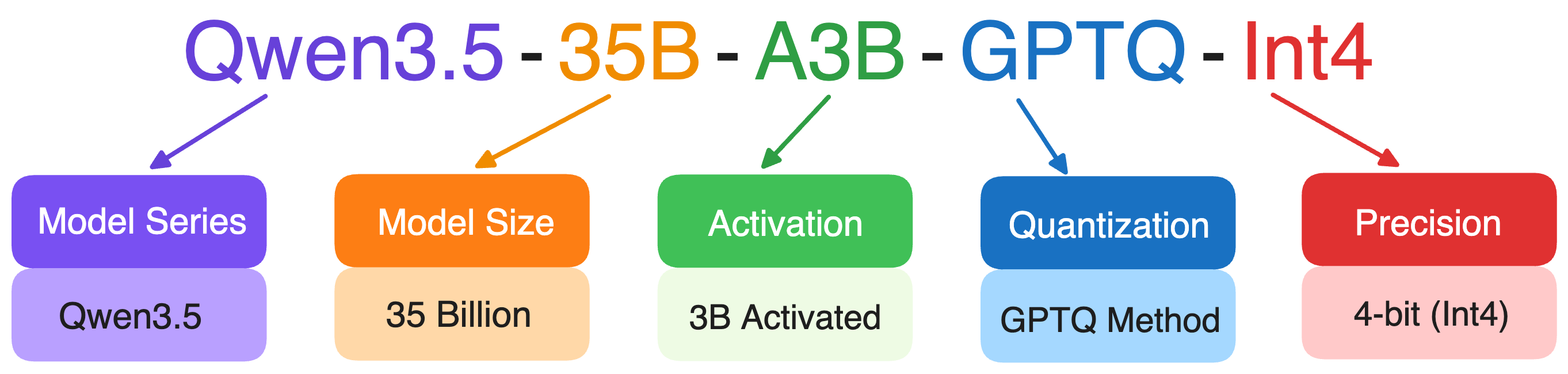
- The number usually indicates the number of parameters in the model. The letter B stands for billion parameters.
- “Instruct” means the model has been instruction-tuned. “Chat” models are optimized for multi-turn conversations.
- Some models have “quantized” versions, meaning the model weights are compressed to reduce memory usage.
- Some model names include a year, month, or date to indicate when the model was released or updated. This helps users quickly identify the generation of the model.
- MoE models sometimes include two numbers in their names to describe how the expert system works, such as Qwen3.5-35B-A3B. These numbers usually indicate:
- The total number of experts
- How many experts are activated during inference
Additional resources
- Model composition
- The Complete Guide to DeepSeek Models: From V3 to R1 and Beyond
- The Best Open-Source Small Language Models (SLMs) in 2026
- A Guide to Open-Source Image Generation Models
- A Guide to Open-Source Embedding Models
- Multimodal AI: A Guide to Open-Source Vision Language Models
- Exploring the World of Open-Source Text-to-Speech Models